Upload a resume; Recruit fills in the candidate's details for you.
Add a PDF or Word resume and Recruit reads it and fills in the name, contact details, education, work history, skills, and total years of experience. The recruiter checks the fields, fixes anything if needed, and saves. No retyping.
AI proposes, humans decide, audit trail records.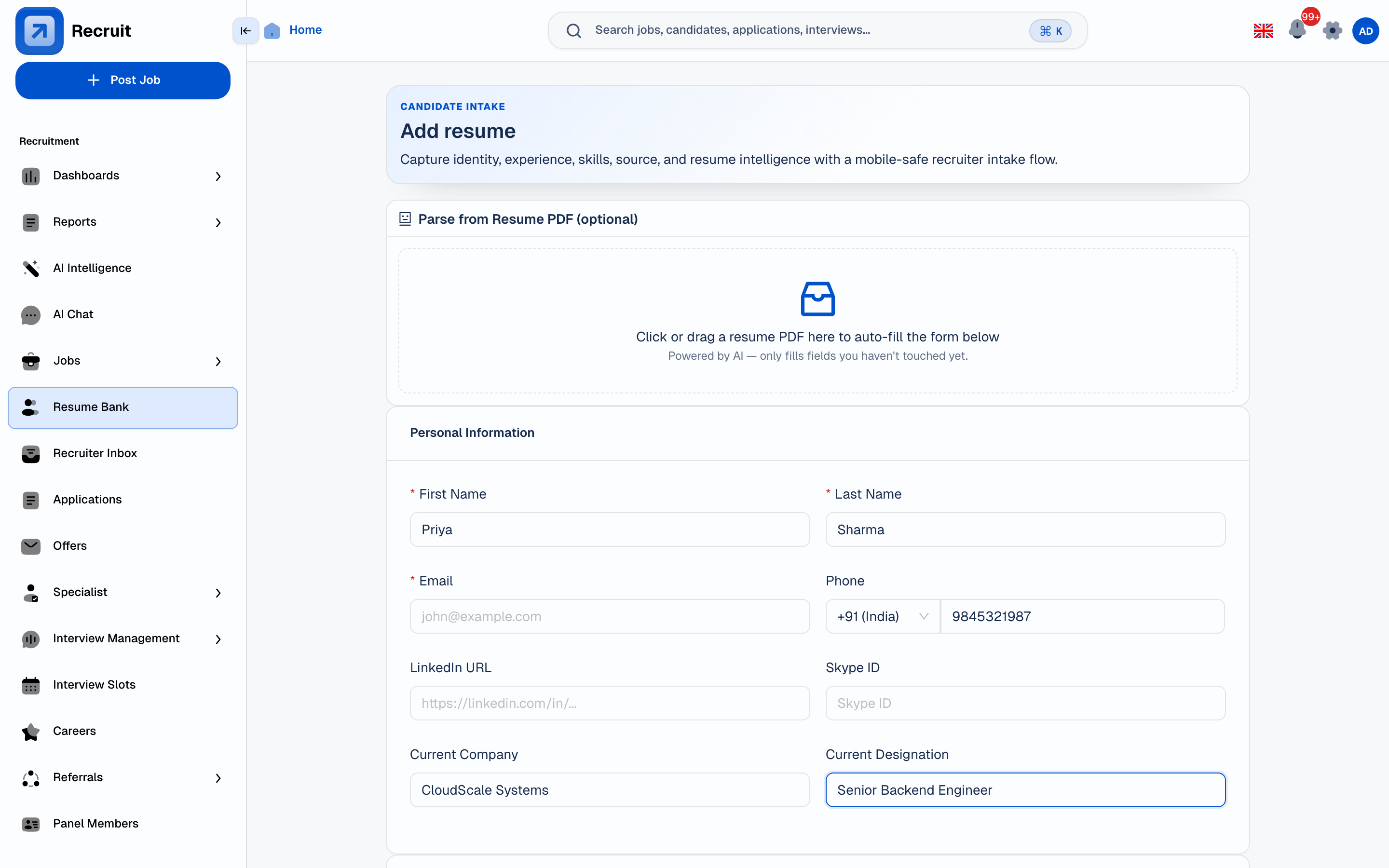 Product screenshot
Captured Jun 16, 2026
Source: local seeded Recruit product capture
Product screenshot
Captured Jun 16, 2026
Source: local seeded Recruit product capture
Fast — no waiting around
Upload triggers immediate parsing. The candidate's details are filled in before the recruiter finishes reading the confirmation message.
Every field is editable
The AI fills the form — the recruiter reviews and corrects. No field is locked. The recruiter remains the decision-maker on what gets saved.
Audit trail on every parse
Who uploaded the resume, when it was parsed, and what fields were changed before saving are all recorded — visible to team leads and admins.
Used automatically by other features
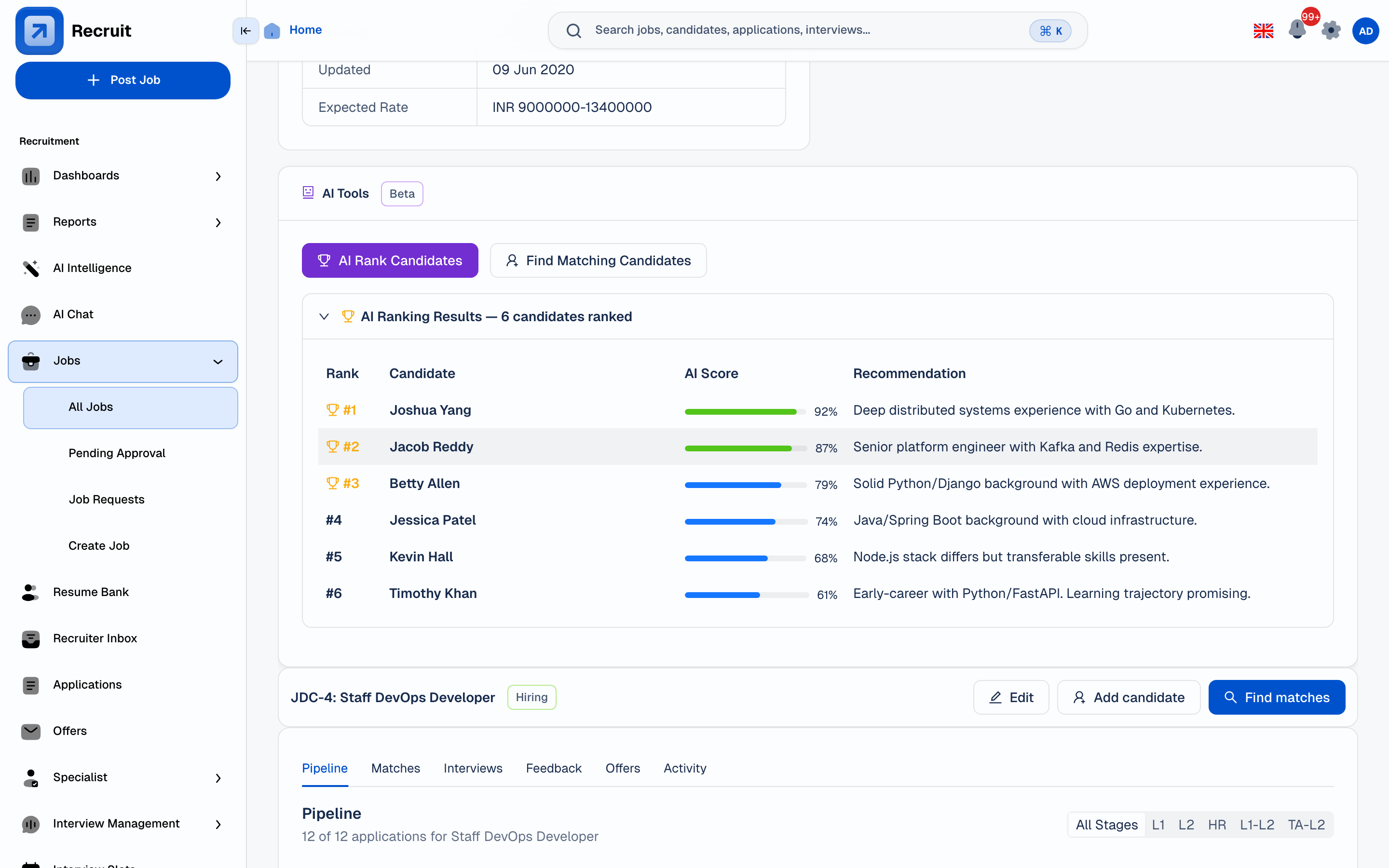
Parsed fields feed directly into candidate ranking, match scoring, and candidate search — no re-entry step needed for those features to work.
Four steps from PDF to a complete candidate profile.
The parser is embedded in the recruiter's existing workflow — no separate tool to open, no copy-paste between systems.
Cuts the time from several minutes of manual data entry per resume to a quick check-and-save step.
- Upload — recruiter uploads PDF or Word doc directly on the Add Candidate screen. Common resume formats are supported.
- Parse — Recruit reads the document and fills in the name, email, phone, location, education institutions and dates, job titles and companies, responsibilities, skills, and total years of experience.
- Review — every filled field appears in an editable form. The recruiter corrects anything that was mis-read before saving.
- Save — the candidate profile is saved with all the details filled in. Those details are then used automatically by candidate ranking, match scoring, and candidate search.
Filled in once, used automatically by every AI feature.
Candidate ranking, match scoring, and candidate search all read from the same details the parser writes. A complete, accurate profile means the AI works more accurately — with no extra work from the recruiter.
- Contact block — name, email, phone, location
- Education — institution, degree, field, graduation year
- Work history — company, title, dates, responsibilities
- Skills — extracted and saved individually, usable in search filters
- Total years of experience — calculated from work history dates, shown on the candidate card
 View full size
Captured Jun 16, 2026
Source: React SPA seeded ranking capture
View full size
Captured Jun 16, 2026
Source: React SPA seeded ranking capture
AI proposes. Humans decide. Audit trail records.
Every parsing decision is transparent, correctable, and logged. The recruiter sees exactly what the AI read before anything is saved.
No hidden extraction
Parsed fields are shown in the form before saving. Recruiters can see exactly what the AI read from the document.
Every field editable
Nothing is written to the candidate record without recruiter review. The form is the checkpoint.
Parse history logged
Upload timestamp, parsed-by user, and any field corrections before save are recorded in the candidate activity log.
Details feed through automatically
Parsed details feed directly into candidate ranking, match scoring, and candidate search — no re-entry needed between those systems.