Integration Marketplace

Every outside tool your hiring uses, connected in one place.

Recruit links the outside tools your team already uses — skills tests, interview-integrity checks, CRM, HR systems, calendars, company sign-in, messaging, email, and your careers page. The connections are already built. To turn one on, an admin enters that provider's login or key. There's no development work to do.

11 ATS categories
13 catalog apps
11 ready now
Marketplace cards reflect the same provider health and settings pages already in Recruit.
Marketplace app assessment integrity check Recruit send candidate receive score/report store & track status link to round visible to hiring team Candidate record linked to job and round

Find the app, connect credentials, work from the hiring record, monitor connection health.

Marketplace catalog

Every connection is described with its category, current status, setup effort, health signal, and governance notes — all in one place.

Provider health

Active connections show their enabled state, credential check, test action, and webhook status so admins know immediately if something needs attention.

Full coverage

Assessments, interview integrity, CRM, HRMS, calendars, SSO, messaging, email, external API, careers page, and background checks are all on one page.

Set up in settings, use from the record

Admins configure credentials in the settings pages. Recruiters then trigger checks and view results from the candidate record — no portal switching needed.

Results in context

Scores, reports, email delivery, and API events are stored against the candidate's hiring record and timeline, not in disconnected external accounts.

Marketplace catalog

All the connections your hiring team uses, explained in plain terms.

Each card below shows what the connection does, whether it is live today or on the roadmap, how much setup is involved, and who is responsible for that setup.

Calendar & SSO

Google and Microsoft Calendar

Admin-configurable OAuth consent and token readiness

Schedule interviews and generate meeting links without leaving Recruit. Recruiter availability stays inside the hiring workflow, and calendar access is limited to what scheduling needs.

Setup effort Medium setup
Governance Consent is explicit and revocable. Calendar access is limited to scheduling — it does not touch the full mailbox.
Calendar & SSO

SSO and Access Control

Admin-configurable Provider readiness and approval gate

Team members sign in with Microsoft or Google. Role assignment and login approval still happen inside Recruit, so access does not bypass the normal governance flow.

Setup effort Medium setup
Governance SSO login respects the admin approval gate. Roles are assigned inside Recruit, not inherited from the identity provider.
Assessments

Skills Assessments

Built — needs your provider Provider ping and webhook health

Send skills tests to candidates straight from their record in Recruit. The connection is built and works with any test provider. An admin adds your chosen provider's login to switch it on, and scores come back automatically against the right job and interview round.

Setup effort Medium setup
Governance Provider credentials and webhook secrets are entered by admins. Stage-level enablement controls which rounds trigger a test.
Interview Integrity

Interview Integrity

Built — needs your provider Signed webhook result intake

Proctoring tools check for suspicious activity during remote interviews and send a report to Recruit. The report attaches to the interview round so the hiring team reviews it alongside the evaluation — not in a separate portal.

Setup effort Medium setup
Governance Incoming reports are verified against a signed webhook and de-duplicated before being stored on the candidate record.
Interview Intelligence

Interview Intelligence

Built — needs your provider Transcript and note intake

AI-generated notes and interview summaries are stored on the hiring record, linked to the correct round. Interviewers spend less time writing up notes and more time on the evaluation itself.

Setup effort Medium setup
Governance Summaries are attributed to the interview round and the tool that produced them. Nothing is stored anonymously.
CRM (HubSpot)

CRM (HubSpot)

Admin-configurable Credential test available

Candidate and contact records stay in sync between Recruit and HubSpot. Account Managers and recruiters see the same information without switching between tools.

Setup effort Medium setup
Governance HubSpot credentials are entered by superadmins and are not visible in standard views.
HRMS

HRMS Employee Sync

Admin-configurable Credential test available

When a candidate is hired, their accepted offer details move to your HR system automatically. There is no need to re-enter the same information a second time.

Setup effort Medium setup
Governance External API credentials are managed by superadmins and are not shown in public-facing views.
Messaging

Team Messaging (Slack / Teams / Telegram)

Admin-configurable Webhook delivery test

Hiring notifications — offer approvals, stage changes, interview reminders — go to the Slack, Teams, or Telegram channels your team already uses. No one needs to log into Recruit to stay informed.

Setup effort Low setup
Governance Notification webhooks are configured by admins. Channel access and event types are controlled per workspace.
Email

Candidate Email Delivery

Admin-configurable SMTP test and delivery settings

Candidate updates are sent from Recruit using your own mail settings, so emails arrive from your domain rather than a generic sender. Admins control the SMTP configuration.

Setup effort Low setup
Governance Mail credentials are stored in runtime settings and the secret field stays blank during edits — the saved value is never exposed.
External API & webhooks

External API and Webhooks

Admin-configurable Signed dispatch and API credential checks

Hiring events are sent to your own systems the moment they happen. Admins choose which events are sent, and the API lets your technical team build custom integrations against Recruit data.

Setup effort Medium setup
Governance Webhooks are signed so they can't be tampered with, and admins choose which events are sent.
Careers & job boards

Careers Page Publishing

Admin-configurable Live job feed active

Open roles are published to your careers page automatically as they are created in Recruit. The page is configurable by admins and does not require a developer to update job listings.

Setup effort Low setup
Governance Publishing is controlled per job. Roles appear only when an admin marks them as active for the careers page.
Careers & job boards

External Job Board Syndication

Roadmap Source tracking planned

Planned: publish roles to external job boards from Recruit and track which board each application came from. Recruiting leads will be able to see which channels produce quality candidates.

Setup effort Roadmap
Governance Publishing controls will require approval before activation on external boards.
Background checks

Background Verification

Roadmap Status model mapped

Background check status — pending, cleared, or flagged — will appear in the candidate hiring timeline. The offer workflow will wait for clearance before proceeding.
Setup effort Partner setup
Governance Verification outcomes will be visible only to roles with the appropriate access level on the hiring record.
How it works

From finding the right connection to using it every day.

The Integration Marketplace connects to the admin settings pages and hiring record pages already in Recruit. There is no separate system to learn.

1

Find the right app

Browse by category, current status, or setup effort to find the connection your team needs.

2

Connect credentials

Admins enter provider URLs, API keys, and webhook secrets in the Recruit settings pages. No development work is required for most connections.

3

Work from the hiring record

Recruiters send tests, trigger checks, and review results from the candidate record — not from separate vendor portals.

4

Monitor connection health

Each connection shows its current state, last result, and any errors. TA leads can check status without asking IT.

How it works

One place for every external result — not one portal per vendor.

Recruiters interact with connected tools from within the candidate record in Recruit. The vendor handles delivery; Recruit handles the result, the health signal, and the audit trail.

Results arrive via the provider's webhook and are stored on the candidate record automatically. No manual import is needed.

Assessment tools

Skills tests with scores in context

Send skill tests from the candidate screen. Score, time taken, and completion status come back to the candidate record linked to the correct job and stage.

Interview integrity

Proctoring reports in the hiring record

Proctoring tools check for suspicious activity during remote interviews. Reports attach to the interview round for the hiring team to review — not a separate dashboard that no one visits.

Background verification

Status tracked in the timeline

Background check status — pending, cleared, or flagged — appears in the candidate hiring timeline. The offer workflow waits for the right status before proceeding.

Product view: governance

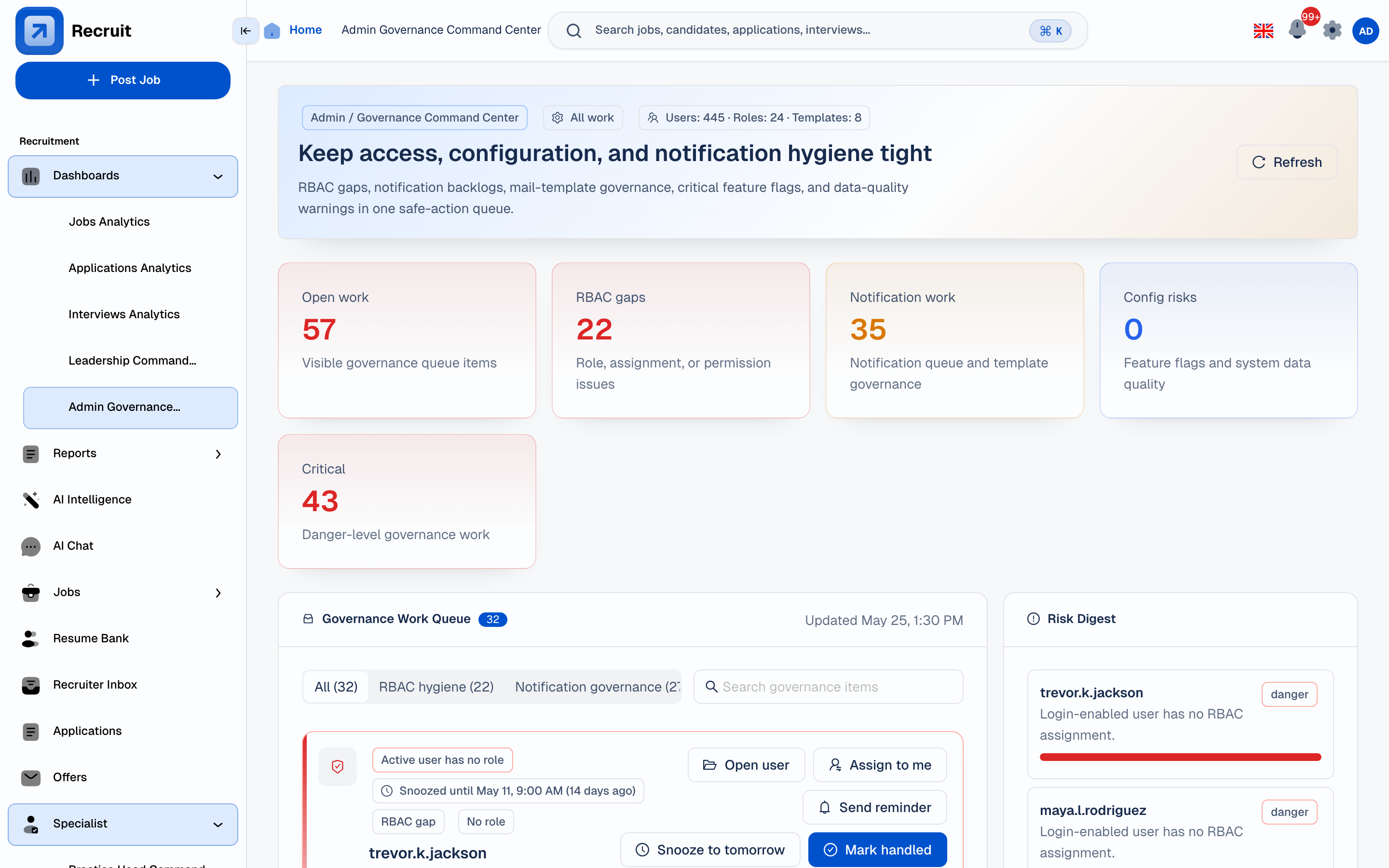
Integration results visible to hiring managers and TA leadership — not hidden in vendor accounts.

The admin command centre shows pending checks, received results, and flagged items across all open roles. TA heads and Account Managers can review integration status without logging into individual vendor accounts.

  • Hiring integrations panel — all sent checks, statuses, and scores in one view
  • Vendor name on every result — no ambiguity about which tool produced the score
  • Linked to job and round — every result traceable back to the specific hire and interview stage
  • No extra admin logins — access is role-based inside Recruit, not via vendor accounts
Admin governance command centre with seeded metrics, hiring progress, interview analytics, and approval activity charts View full size Captured Jun 16, 2026 Source: local seeded admin command-centre capture
Implementation & trust

External tools that strengthen the hiring record, not fragment it.

Integrations are built to reduce the number of portals recruiters need to maintain — not add another one. Every result feeds the existing hiring record and timeline.

Credential governance

Secrets stay behind admin settings

Credentials are entered by admins, masked after saving, and testable without exposing the raw value anywhere in the application.

Provider health

Every live connection has a health check

Each active integration shows its enabled state, a test action, and the last result or error. Webhook readiness is shown where relevant.

Audit trail

Results are part of the hiring record

Scores, reports, and status updates are stored against the candidate timeline with the provider name, timestamp, and the job and round they belong to.

Role-based setup

Admins connect, recruiters operate

Setup and credential management are restricted to admin roles. Day-to-day recruiter actions happen from the normal hiring pages.

See the Integration Marketplace inside your hiring pipeline.

Compare connections, configure provider health, and route results back to the hiring record.